The Handy on Android
FunFlixDroid plays your own videos and funscripts on Android and syncs The Handy with them, stroke for stroke, with no other app to install. There are two ways to connect it: Bluetooth, free, or WiFi with its connection key, for Patreon supporters.
Which connection works with your model
| Model | Bluetooth (free) | WiFi (Patreon) |
|---|---|---|
| The Handy | Yes | Yes |
| The Handy 2 | Not supported by Buttplug.io yet | Yes |
| The Handy 2 Pro | Not supported by Buttplug.io yet | Yes |
Connect over Bluetooth
- Install FunFlixDroid from the download page.
- Turn on Bluetooth and open the Devices tab: the engine built into the app connects by itself.
- Once The Handy shows in the list, tap Test to check it reacts.
The connection guide covers this in detail. Bluetooth goes through Buttplug.io, like every other toy.
Connect over WiFi
- Find your connection key in the Handy app or on handyfeeling.com.
- In FunFlixDroid, open the Auth tab and tap Connect with Patreon to unlock the feature.
- Open Devices → Handy (Wi-Fi), enter the key, and tap Pair Device.
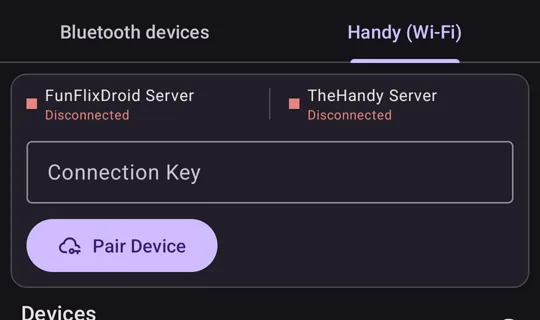
The top of the tab shows whether the FunFlixDroid and TheHandy servers are connected.
Connecting a Patreon account gives 7 free days on the first login, then one free day each month to try it. To keep it, support the project on Patreon.
Over WiFi, the script being played is sent to The Handy’s own online service, which is how the toy gets it. See the privacy policy.
Which one to choose
- Bluetooth costs nothing and needs no connection key. It is the one to try first on the original Handy.
- WiFi is the only way on The Handy 2 and 2 Pro for now.
Then play a video
Add a folder with your videos and scripts, following Getting Started. A script is matched to its video by file name, as explained in the naming convention. If you have no scripts yet, see Getting Videos and Funscripts Online.
Updated 5 November 2026